


 ClickUp
ByDesign vs ClickUp
ClickUp runs a team’s work. ByDesign runs your life, and your team can join.
ClickUp is a work platform: Spaces, Folders and Lists, custom fields, Board, Gantt, Timeline and Whiteboard views, Docs, Chat, Dashboards and an AI layer called Brain. ByDesign is a planner for one person first: goals the AI turns into a scheduled plan you approve, habits with streaks, notes, a Pomodoro timer and a year-to-day canvas, with sharing, chat and team plans when you need them.
What you get with ByDesign that ClickUp doesn’t offer
Built for your life, not only your work
A habit tracker with streaks and stats, goal pages built from a goal, Hub courses and roadmaps you can schedule, and a Pomodoro timer. ClickUp has Goals with targets, recurring tasks and reminders, a Template Center, and Pomodoro through an integration.
A schedule you approve
ByDesign places tasks around your hours, breaks and buffers, shows the proposed week and waits for your OK. ClickUp’s calendar blocks focus time for your tasks with AI; a preview-and-approve step isn’t part of what ClickUp describes.
Your whole year on one canvas
Year, quarter, month, week and day on one zoomable surface, with sticky notes, images and pinned pages on the plan itself. ClickUp has a day, week and month calendar, Gantt and Timeline views, and sticky notes on separate Whiteboards.
Voice that runs the plan
Talk to ByDesign with the mic or hands-free with a wake phrase, and the assistant moves and reschedules items with your calendar, goals, habits and notes in view. ClickUp’s Talk to Text dictates updates, tasks and Docs in Brain MAX, a trial on the Free plan.
ByDesign vs ClickUp, feature by feature
Only the differences. What both apps do the same is listed underneath.
- Included
- Limited
- Not available
AI planning
AI goal plans
ByDesign
Included: Built and scheduledTasks, subtasks, courses and deadlines land on your calendar; AI and AI Plus plansClickUp
Limited: Brain creates tasksDescribe what you need and Brain creates tasks, subtasks, Docs and lists; Goals track targets; no plan with courses and deadlines is built from a goal for you to approveAI scheduling with a preview you approve
ByDesign
Included: Preview, then acceptConflicts shown; nothing saves until you say so; AI and AI Plus plansClickUp
Limited: AI Time-BlockingAI blocks focus time for your tasks; no preview-and-approve step describedAuto-schedule around your hours
ByDesign
Included: Rules you setWork hours, breaks, buffers, max hours a day, split long tasksClickUp
Limited: AI auto-schedulingThe calendar schedules priority tasks and blocks focus time around meetings and working hours; no preview step describedVoice control
ByDesign
Included: Mic and hands-freeOptional wake phrase; AI and AI Plus plansClickUp
Limited: Talk to Text, Siri and Google AssistantDictate in Brain MAX (a trial on Free); Siri and Google Assistant on mobile
Planning views
Year-to-day planning canvas
ByDesign
Included: Year to dayYear, quarter, month, week and day on one zoomable surface; AI and AI Plus plansClickUp
Limited: Calendar, Gantt and TimelineDay, week and month calendar plus project timelines; no zoomable year-to-day life canvasSticky notes, images and pinned pages on the calendar
ByDesign
Included: YesClickUp
Limited: On WhiteboardsSticky notes and shapes on a Whiteboard, separate from the calendarCustomisable dashboard
ByDesign
Included: Drag-and-drop widgetsScore board, tasks, habits, inbox, pinned pages, KanbanClickUp
Limited: DashboardsCards for tasks, sprints, time and goals; a trial on Free and Core, included from Business
Habits, focus and learning
Habit tracker
ByDesign
Included: Check-ins and streaksSkip a day, stats, habits with friendsClickUp
Not available: Recurring tasks and reminders insteadCourses and roadmaps from the Hub
ByDesign
Included: The HubCourses, roadmaps and a habit library; schedule a roadmap straight onto your calendarClickUp
Not available: Template Center and ClickUp UniversityTemplates for every item and training on ClickUp itself; no courses to schedule onto your calendarPomodoro timer
ByDesign
Included: Built in25/5/15 cycles with a floating timerClickUp
Not available: Through the PomoDone integrationA time tracker is built in
ClickUp column based on features, calendar, goals, Brain, Brain MAX, Whiteboards, time tracking, pricing, apps and developer docs on October 26, 2026. If something has changed, email info@bydesign.io.
Both apps cover the basics
- An AI assistant that knows your tasks and notes
- Google and Outlook calendar sync
- Time blocking
- Tasks with subtasks, priorities, estimates and recurring schedules
- Goals with targets and progress
- Docs with nested pages
- Kanban boards
- Time tracking with a timer
- Assignees, comments and @mentions
- Built-in chat
- Per-seat team plans
- MCP server for AI assistants
- Web, Mac, Windows, iOS and Android apps
Why people switch from ClickUp to ByDesign
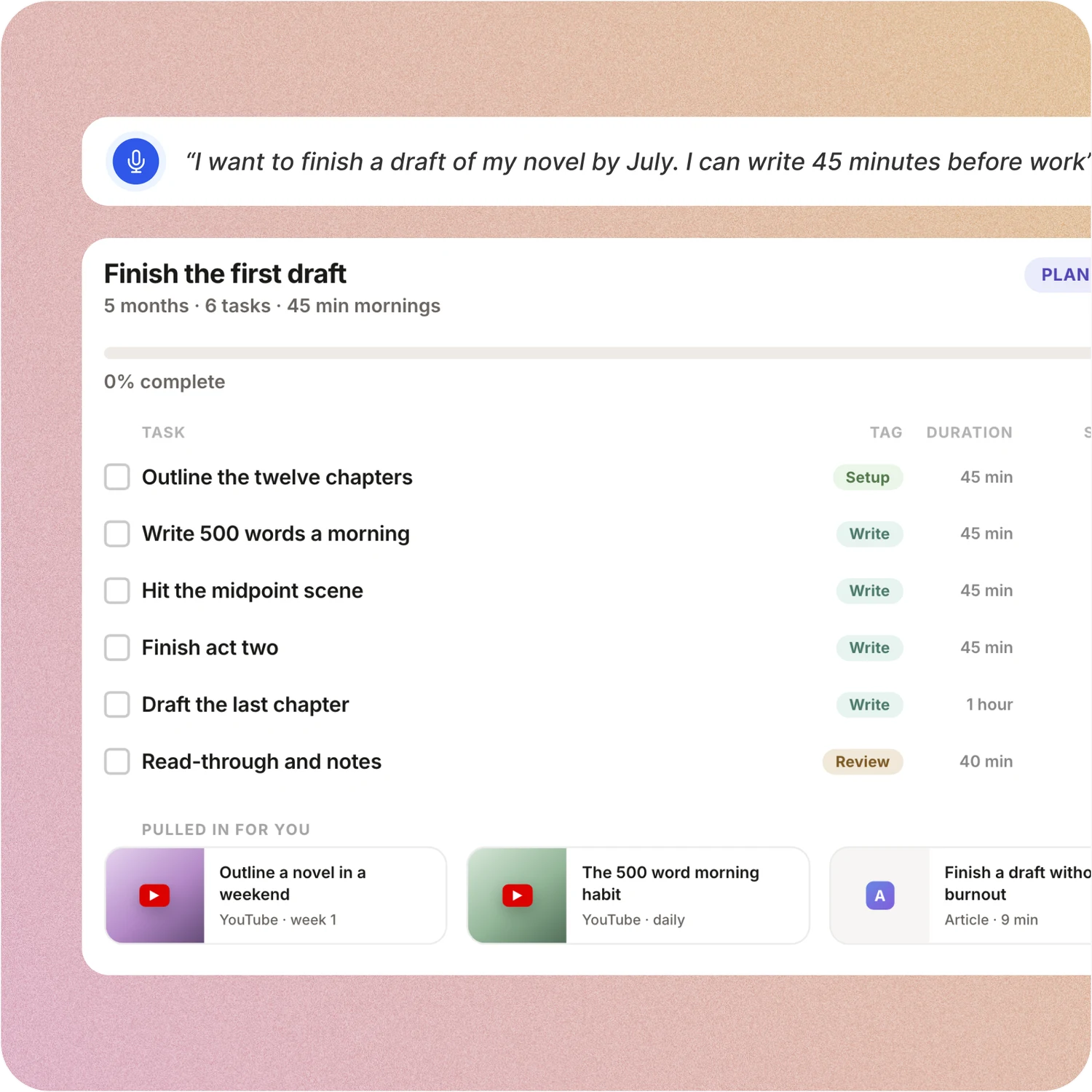
Say the goal. Get a scheduled plan.
Tell ByDesign what you want to achieve. It asks a few questions, then builds the tasks, subtasks, courses and deadlines and schedules them around the life you already have. Replan in one message.
ClickUp: ClickUp Brain can create tasks, subtasks, Docs and lists from a description, and Goals track number, currency, true-or-false and task targets. Its calendar promises to “plan your perfect schedule based on your tasks, events, and goals”, but there is no step where a goal becomes a plan you read and approve.
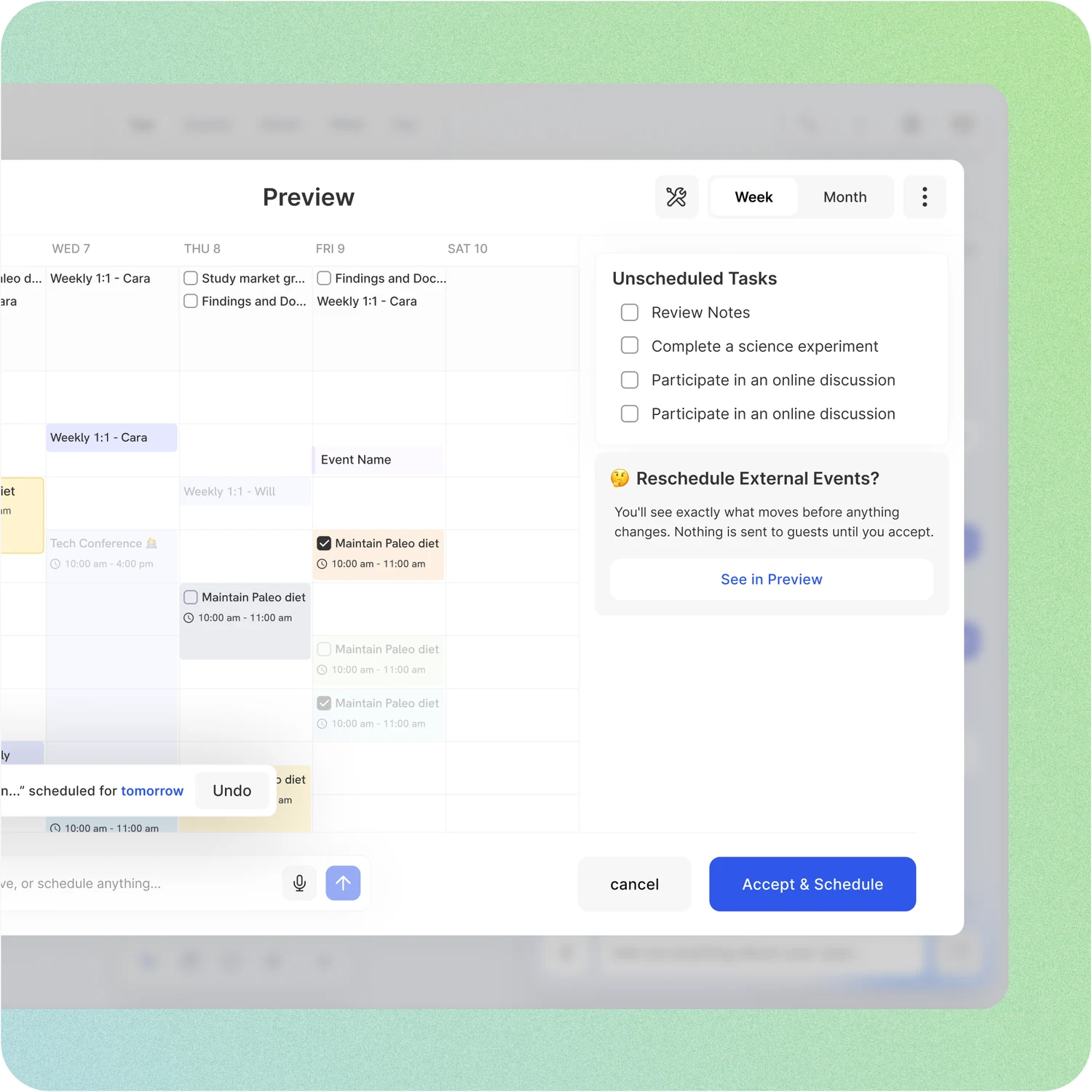
A schedule you approve, not one that just happens
Set your hours, breaks and buffers once. ByDesign places tasks into the gaps, splits long ones, shows the proposed week and waits for your OK. Replan after a busy day in one message.
ClickUp: ClickUp’s calendar says AI will “plan your perfect schedule based on your tasks, events, and goals” and block focus time around meetings. No preview or approval step is described, and Brain is a paid add-on or runs on credits.
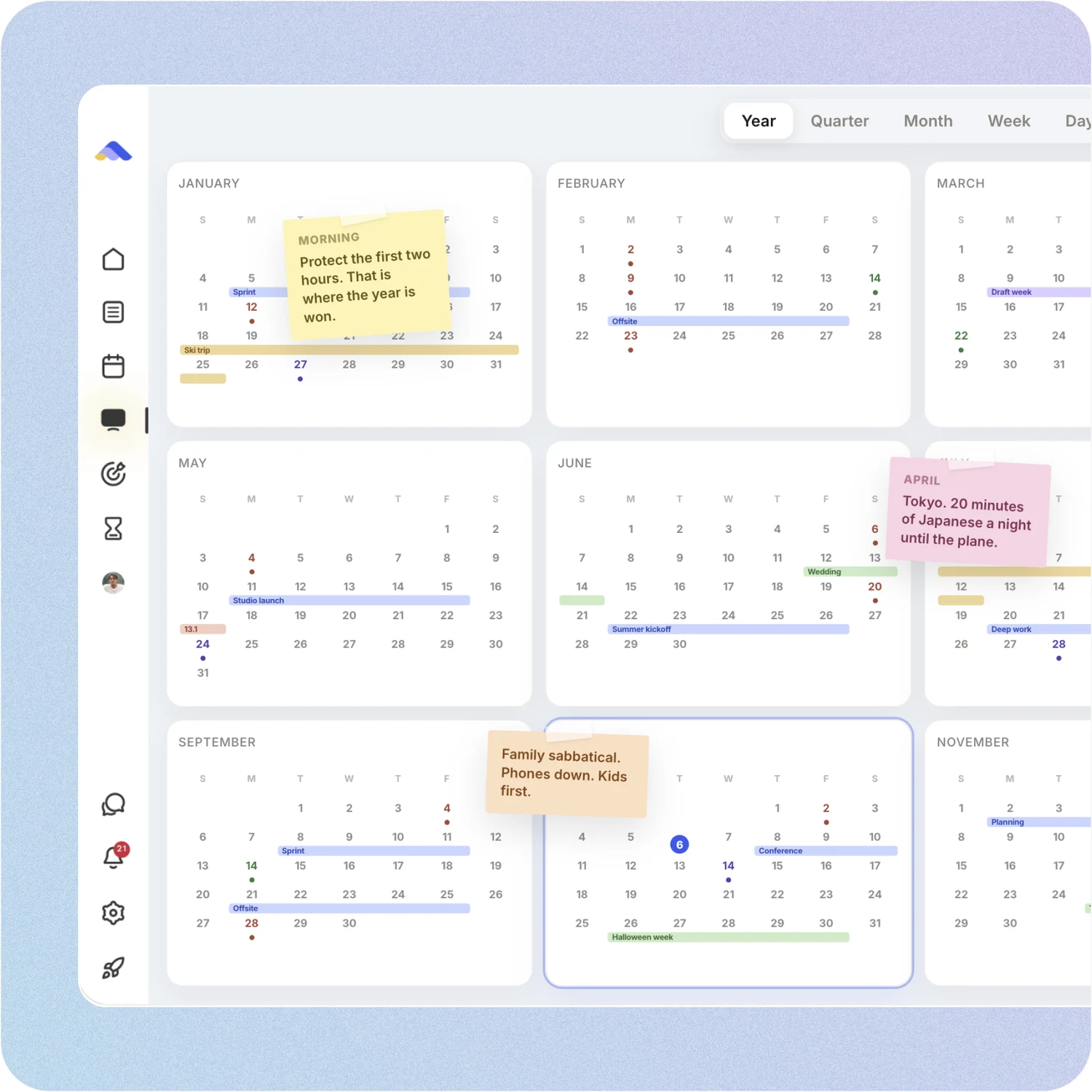
Your whole year on one surface
The planning canvas zooms from the full year down to a single day. Pin goals, notes and milestones where they belong, drag anything, and the plan keeps up.
ClickUp: ClickUp’s Calendar view shows a day, week or month; Gantt and Timeline show projects over time; Whiteboards hold sticky notes on their own canvas. The long view and the plan live in different places.
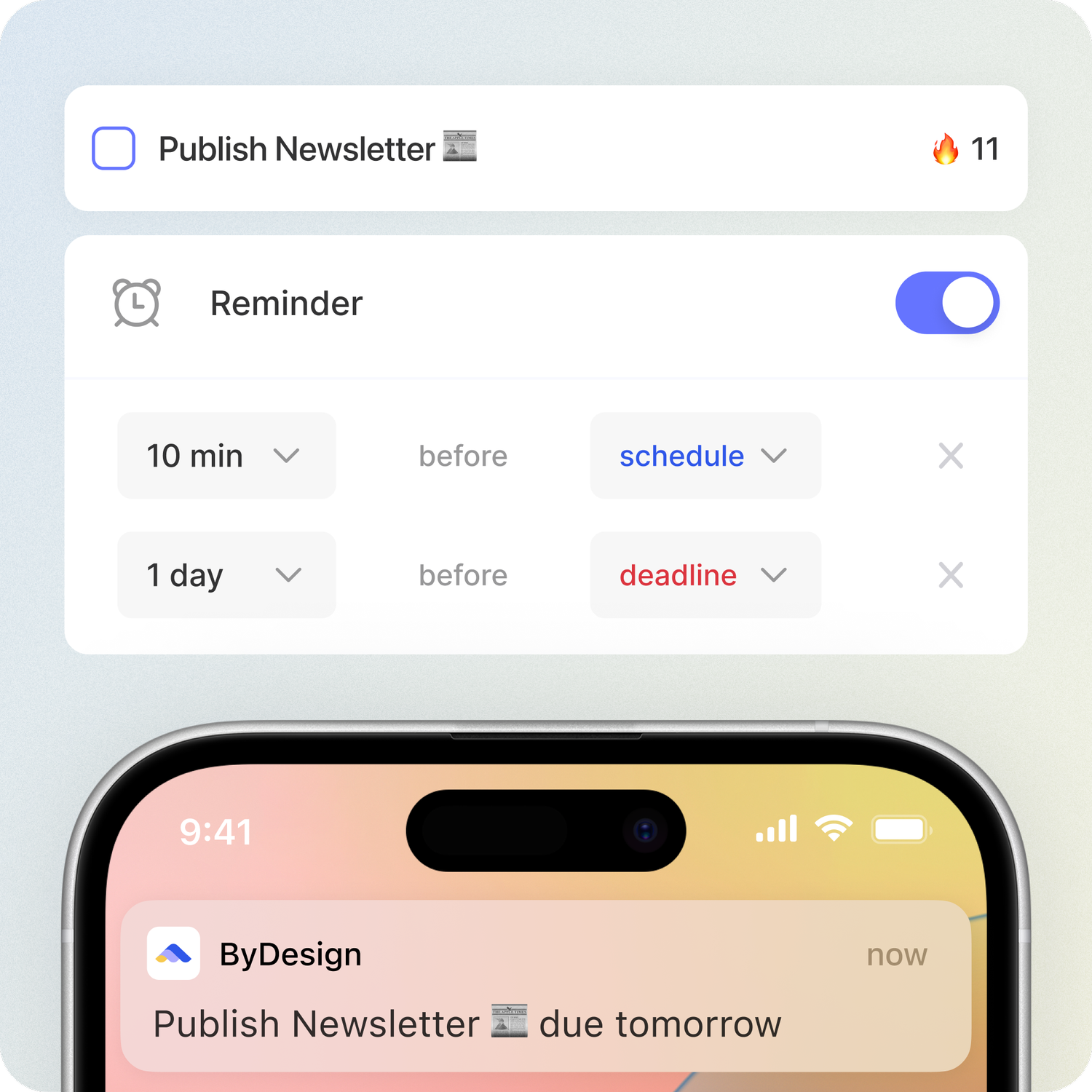
Habits, focus and courses, built in
Track habits with streaks and stats, run a Pomodoro, and schedule a Hub roadmap onto your calendar in one click. Open ByDesign in the morning and it already works.
ClickUp: ClickUp builds routines with recurring tasks and reminders, offers Pomodoro sessions through the PomoDone integration, and ships a Template Center and ClickUp University instead of courses.
Don’t take our word for it.
From Callio
Can I just say I love you. Finally, a good-looking app that isn’t complex as hell. There are tears in my eyes. I’ll happily pay for this!💯
From adsm1993
Omg I downloaded the app and this is MY DREAM! Is like an easier onenote/word/calendar/notes in ONE🙏
From TuneOutlyson003
I just wanna say that I have FINALLY found a to-do list app where I can have recurring tasks and habit/org systems in one place. This is awesome because I keep wondering if one day my autonomous self will break....this is awesome so far!
Make the switch in three steps
No workspace to design. Start free, connect the calendar you already use, and give ByDesign your first goal.
- Start your free trial. No credit card.
- Connect your Google, Apple or Outlook calendar.
- Say your first goal and watch the plan land on your calendar.
More comparisons
See how ByDesign stacks up against the other planners people switch from.
 ByDesign vs Notion
 ByDesign vs Todoist
 ByDesign vs TickTick
 ByDesign vs Griply
 ByDesign vs Motion
 ByDesign vs Sunsama
 ByDesign vs Things 3
 ByDesign vs Akiflow
 ByDesign vs Reclaim.ai
 ByDesign vs Morgen
 ByDesign vs Amazing Marvin
 ByDesign vs Timestripe
 ByDesign vs OmniFocus
 ByDesign vs Strides
 ByDesign vs Streaks
 ByDesign vs Habitica
 ByDesign vs Goals Wizard
 ByDesign vs Any.do
 ByDesign vs Structured
 ByDesign vs Amie
 ByDesign vs Superlist
 ByDesign vs Routine
 ByDesign vs Lunatask
 ByDesign vs Ellie Planner
 ByDesign vs Tweek
 ByDesign vs Asana
 ByDesign vs Trello
 ByDesign vs monday.com
Ready for a planner that fits your life?
Start free. No credit card. Tell ByDesign a goal and watch the plan land on your calendar.
Try ByDesign free